NorthStar × Boxie Integration

Boxie smart locker pickup that runs off the POS, not a rack by the door.

When the kitchen marks an order ready in NorthStar, a Boxie locker lights up with the guest's name on the screen. Every order channel hands off the same way, and your staff gets out of the pickup business.

Available to NorthStar operators now. Works alongside NorthStar Order Entry on iPad and Windows.

The Problem

Pickup is the one step nobody measures. Bags sit out in the open by the door, staff leave the line to hand them over, and no one knows how long an order waited.

Restaurants have spent years speeding up prep and digital ordering. The handoff still happens on a metal rack that invites theft and eats your team's attention, with no data behind it. NorthStar and Boxie close that gap without adding a person to run it.

What You Get

Lockers, notifications, and handoff data.
Driven by the order status NorthStar already has.

Automatic Assignment

The locker knows the order is ready before anyone says so

  • Pickup orders auto-assigned to a locker from Order Entry
  • Locker lights up when the kitchen marks it ready
  • Guest's name shown on the locker touchscreen
  • Notification sent once staff load the order
  • Web, walk-in, phone, and delivery orders handled the same way
Secure Pickup

The right order to the right person

  • Secured, clear compartments instead of an open rack
  • Guests and drivers open with touchscreen, SMS link, or QR code
  • Staff stay on the line instead of at the door
  • Your restaurant's branding on the front screen
Handoff Data

Numbers on the step nobody could measure

  • End-to-end fulfillment time
  • Pickup speed by ordering channel
  • Locker utilization across the day
  • Alerts when an order has been sitting too long
  • Both systems working off the same order record

How It Works

Three steps, one order record.

Step 01

Ring it on NorthStar

Orders from your online ordering, the counter POS, a self-service kiosk, the phone, or a delivery platform land in NorthStar the way they always have. Nothing changes at the counter or in the kitchen.

Step 02

It lights up on its own

When the kitchen marks the order ready, Boxie assigns a locker, lights it up, and shows the guest's name. Staff load it and the notification goes out. Nobody calls names or sends a text.

Step 03

Open, pick up, measure

The guest or driver opens the locker with the touchscreen, an SMS link, or a QR code. Every handoff is timed, so you see pickup speed by channel and which orders sat too long.

See It Work

Countertop, tower, or wall.
Sized to the space you have.

Boxie lockers are modular and carry your restaurant's branding on the front screen. Watch the pickup flow, then pick the footprint that fits your space.

Boxie smart locker pickup video
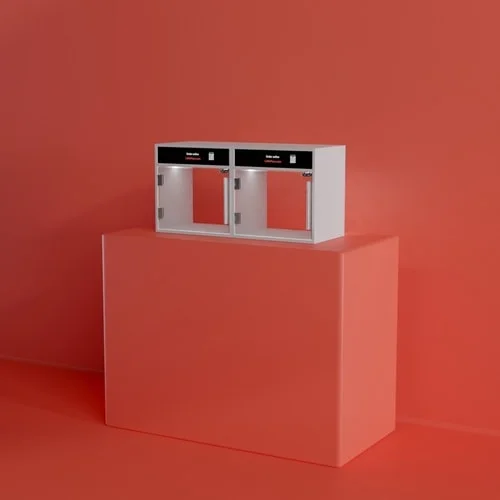
Boxie countertop smart locker with two lit pickup compartments on a restaurant counter
CountertopSits right on the pickup counter.
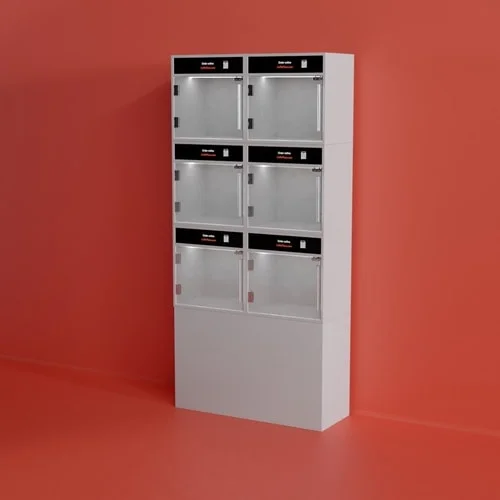
Boxie freestanding smart locker tower with six pickup compartments for a restaurant vestibule
Freestanding towerStands in the vestibule or by the door.
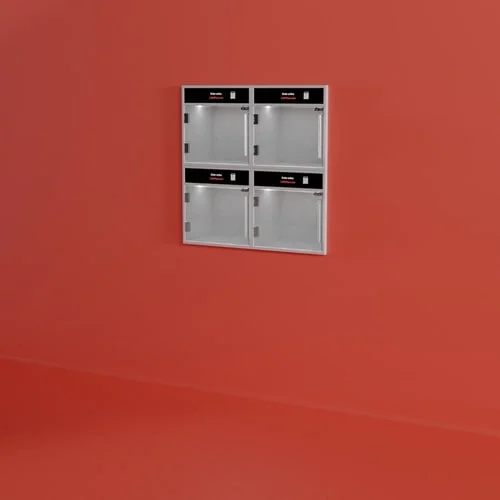
Boxie wall-mounted smart locker with four pickup compartments
Wall-mountedMounts on the wall under your pickup sign.

Questions, Answered

The integration, in plain terms.

What does the NorthStar + Boxie integration do?
It connects Boxie's smart lockers directly to NorthStar Order Entry. Pickup and delivery orders are routed into a locker automatically, driven by the order status NorthStar already has. When the kitchen marks an order ready, the locker lights up and shows the guest's name.
How do restaurant pickup lockers work with a POS?
The POS already tracks each order's status. With NorthStar and Boxie, that status drives the locker: when the kitchen marks an order ready, Boxie assigns a locker, lights it up, and shows the guest's name. Staff load the order, the notification goes out, and the guest opens the locker when they arrive.
What does the guest or driver actually do?
They find the locker with their name on the screen and open it with the touchscreen, the SMS link in their notification, or a QR code. No digging through bags on a rack, and no waiting for someone at the counter.
Does Boxie integrate with NorthStar POS?
Yes. Boxie integrates directly with NorthStar Order Entry, the NorthStar POS for iPad and Windows. The integration is available to NorthStar operators now, and CBS NorthStar coordinates the locker deployment alongside the POS install.
Do the lockers work for delivery drivers?
Yes. Orders from delivery platforms land in NorthStar like any other order and are routed to a locker the same way. Drivers open the locker with the touchscreen, an SMS link, or a QR code, so nobody has to stop and hunt for the right bag at the counter.
What will I be able to measure?
Fulfillment time end to end, pickup speed by ordering channel, locker utilization, and alerts when an order has been sitting too long. Both systems work off the same order record, so the numbers match what NorthStar already knows about the order.
Will the lockers fit my space?
Boxie lockers are modular and configured to the space you actually have. That can be a countertop stack of four, a freestanding tower in the vestibule, or a wall of twelve under a lit pickup sign, each carrying your branding on the front screen.
Who handles setup and support?
CBS NorthStar coordinates the locker deployment alongside your POS install, so you work with one team on configuration and support. The integration is available to NorthStar operators now.

Last updated September 23, 2026

Talk To Us

See it at your pickup counter.

Tell us about your brand and your space, and we'll show you exactly how orders move from NorthStar into a Boxie locker. We'll follow up with:

  • A walkthrough tied to how your locations actually run
  • What it takes to add Boxie lockers to your locations
  • Straight answers on timeline and rollout
Loading form…

Let KitchenAI Take It From Here 🚀

We will be in touch soon. 🚀