Home › Solutions › Labor Management

NorthStar Advanced Labor and tipOUT

Restaurant labor management, from the schedule to the tip out.

Forecast from every sales channel, build the schedule in minutes, keep every punch inside the rules, and pay out tips without a spreadsheet. All of it fed by NorthStar Order Entry.

What scheduling time is worth
  1. 30 to 60 minsaved per manager, per week, on building the schedule
  2. 30,000 hoursa year, across a large restaurant chain
  3. $1.2Ma year in manager time, at $40 an hour

An illustration of manager time saved on scheduling across a large multi-unit chain. Your numbers depend on your locations, managers and schedule.

NorthStar labor management runs at

  • Surcheros Fresh Mex
  • Wahoo's Fish Taco
  • Big Bad Breakfast
Since 1994Family owned
10,000+operators on NorthStar
Around the clockin-house support

What it is

What is restaurant labor management software?

It's how you decide who works when, track every hour they work, keep it all inside labor law, and pay people correctly, including their tips. On NorthStar it comes in three parts that share the same sales data, so the schedule is built on what you actually sell and nobody re-enters hours.

In Order Entry

Servers log on with a card or a number, managers handle tips at the POS, and every sale feeds the labor forecast.

NorthStar Advanced Labor

Forecasting, scheduling, time clock, hiring and compliance, built with our labor partner TimeForge and connected both ways to Order Entry.

tipOUT

NorthStar's tip distribution: tip pools split by your rules and paid out on your schedule.

Who it helps

How does labor management help managers, staff and owners?

General managers

  • A schedule built from the forecast in minutes, not a Sunday night
  • Overtime, long punches and early or late clock-outs caught before they cost you
  • Tip pools calculated for you, every shift

Hourly staff

  • Their schedule on a phone app
  • Extra shifts picked up at nearby locations
  • Tips paid out on a schedule they can count on

Owners, payroll and HR

  • Hours billed to the right department and location
  • Labor law and fair workweek rules applied automatically
  • Hours sent to payroll without retyping

NorthStar Advanced Labor

What's in NorthStar Advanced Labor?

Built with TimeForge and connected both ways to Order Entry, so sales from dine-in, kiosk, pickup, delivery and online orders all shape the schedule.

Sales forecasting

Forecasts built from NorthStar sales across every channel, not last year's guess.

Schedules in minutes

Schedules with full coverage generated from the forecast, then tweaked by the manager.

Time clock

Clock in on an iPad or a hardware time clock, with long punches and early or late clock-outs flagged.

Automated compliance

Overtime and labor law rules, including fair workweek, applied as the schedule is built.

Shifts across locations

Staff pick up shifts at nearby stores, and the hours bill to the right location.

Hiring and onboarding

Online applicant tracking with your own criteria, reusable job posts and online new-hire forms.

Task management

Assign and track the tasks that go with each shift.

Mobile apps

Apps for employees and managers, with schedules and shift pickups on the phone.

See all labor management partners

tipOUT by NorthStar

How does tipOUT handle tip distribution?

The tip pool math nobody wants to do at close, done for you and paid out on your schedule.
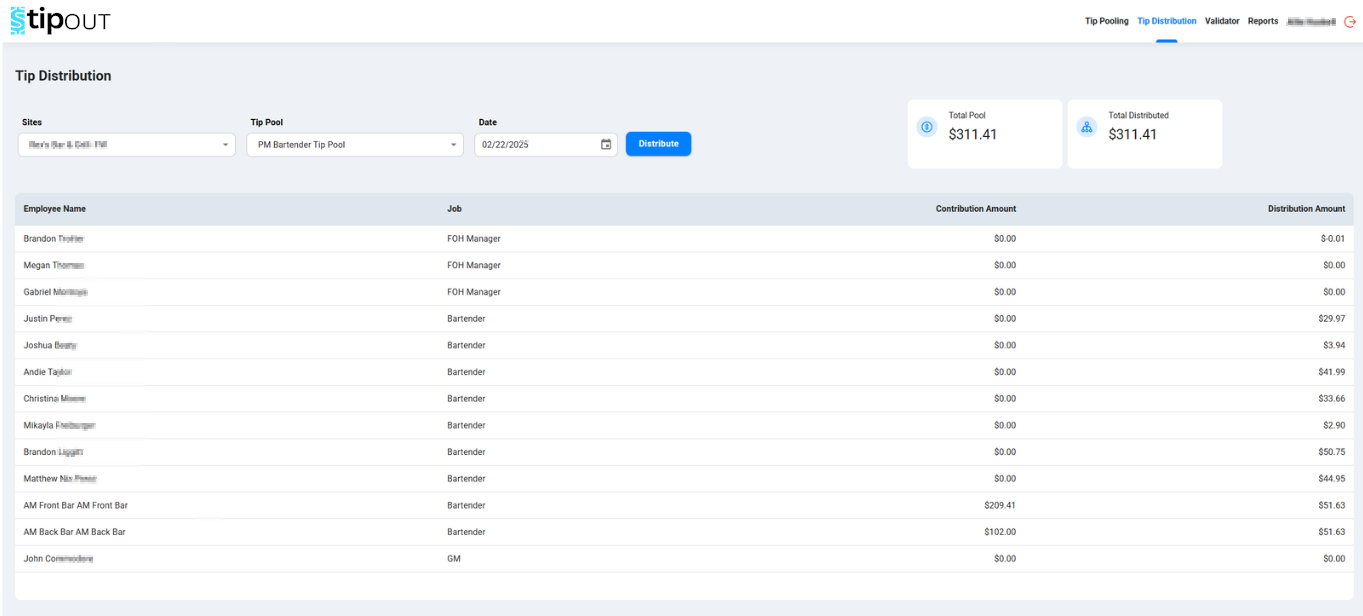
01
Your rulesSplit by sales, hours worked or a custom method, by job role, including staff who work more than one job.
02
Your periodsAllocate by shift, day, week or pay period, and pay out automatically.
03
Reports everyone can checkManagers and staff see exactly how every payout was worked out, so disputes go down.

Explore tipOUT and its ROI calculator

tipOUT tip distribution screen showing a tip pool for one site and date, with each employee's job and distribution amount and the total pool distributed

Getting started

How long does labor management take to set up?

Setup takes hours. Implementation and training take a few days.

1

Talk through your stores

We start with a call about how you schedule, clock and pay out tips today.

2

Connect to Order Entry

Sales history flows in so the first forecast starts from real numbers.

3

Set your rules

Overtime, breaks, tip pools and payroll export, set once for every location.

4

Train and go

Managers and staff get the apps, and our help desk answers around the clock.

FAQ

Restaurant labor management questions, answered

Does NorthStar labor management work with my NorthStar POS?
Yes. NorthStar Advanced Labor connects both ways with NorthStar Order Entry, so sales from dine-in, kiosk, pickup, delivery and online orders feed the forecast and the schedule. Servers log on to the POS with a card or a number, and managers handle tips at the POS. Nobody re-enters sales or hours between systems.
Does it integrate with my payroll provider?
NorthStar Advanced Labor integrates with dozens of payroll systems, so approved hours, overtime and tips go to payroll without being retyped. Tell us which payroll provider you use when we talk through your operation and we'll confirm the connection before you commit, along with how tipOUT payouts land in each pay period.
Is there a mobile app for employees and managers?
Yes. Employees and managers get mobile apps. Staff see their schedule and pick up open shifts, including at nearby locations, from their phone. Managers can review the schedule and labor from anywhere. Clocking in happens on an iPad time clock or a hardware time clock at the store, so every punch is captured where the work happens.
How long does it take to set up restaurant labor management?
Setup takes hours, and implementation and training take a few days. Sales history comes in from NorthStar Order Entry so the first forecast starts from real numbers, then you set overtime, break and tip pool rules once for every location. Our help desk supports managers and staff around the clock after you go live.
How is NorthStar different from a standalone scheduling app?
A standalone scheduling app guesses demand from whatever you type into it. NorthStar Advanced Labor builds the forecast from every NorthStar sales channel, applies labor law and fair workweek rules as the schedule is built, handles hiring and onboarding, and pairs with tipOUT for tip distribution. One company supports the POS and the labor side together.
How much does restaurant labor management software cost?
It depends on how many locations and employees you have, which parts you use (Advanced Labor, tipOUT or both), and which time clocks you need. NorthStar quotes labor management for your operation rather than publishing one price. Request pricing and we'll scope it with you, along with the rest of your NorthStar setup.

Last updated: 22 October 2026

Give your managers their Sunday night back.

Tell us how you schedule and pay out tips today. We'll start with a conversation, then show you labor management set up around it.

#findyournorthstar

Let KitchenAI Take It From Here 🚀

We will be in touch soon. 🚀